XAIO Pulse
Your AI business operator.
Pulse reviews your books, payroll and roster the way a junior bookkeeper would. It catches what humans miss, and drafts the action so you can approve it in one click.
Officeworks invoice #8842 ($312.40) looks like a duplicate of #8839, want me to flag it?
Drafts, never auto-sends. You approve everything, with an audit trail on every action.
Examples of Pulse at work: it flags a suspected duplicate bill for review, prepares a BAS draft that traces back to the ledger, and drafts an overtime timesheet adjustment. Every action is a draft until a person approves it.
On purpose
No chat window, on purpose.
Pulse doesn’t open with a prompt box. It works from a feed: every proposal names what it found and what it wants to do, then waits for one of two buttons, Approve or Dismiss. Nothing executes on the strength of a chat message, and the highest-risk proposals, lodging a BAS, paying a large bill, never auto-execute at all, no matter how many similar ones you’ve approved before.
Three pillars
A junior bookkeeper, in software.
Pulse isn’t a chatbot bolted to your accounting. It’s an AI agent with real reasoning over your full operational data, and a junior’s instinct to bring you the decision rather than make it.
Watches
It never sleeps.
- Reviews your transactions and books
- Cross-checks bills, invoices and payroll
- Surfaces only what needs your attention
Forecasts
Sees the next 90 days.
- 90-day cash flow projection
- Looks at your recent income and upcoming bills
- Flags risk before it becomes an issue
Drafts
Asks before it acts.
- Reminders, follow-ups, journal entries
- You see the diff and approve in one click
- Critical-risk proposals never auto-execute, approved or not
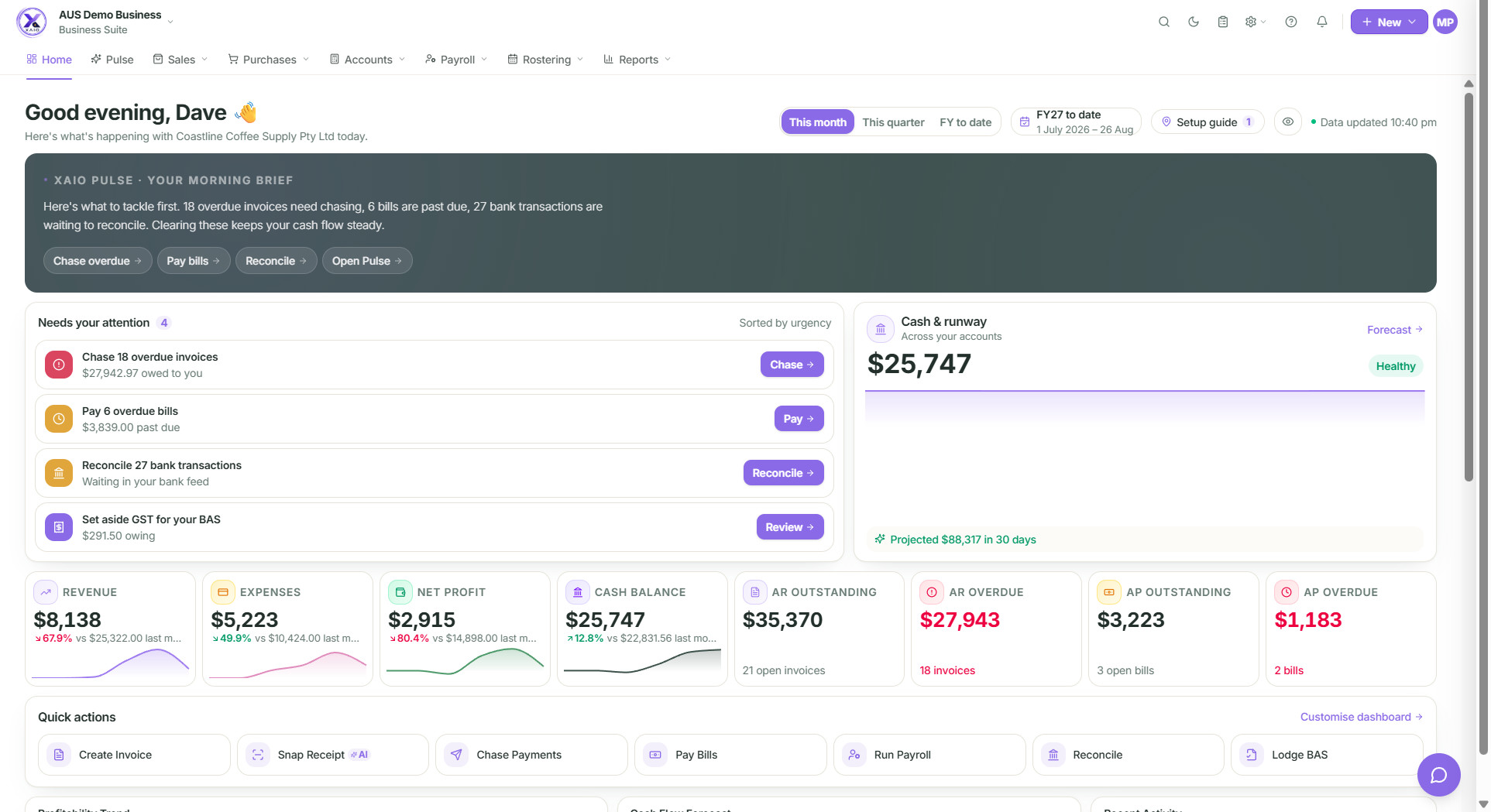
Pulse’s morning brief on the dashboard, real product screenshot, demo company data. Nothing happens without your approval.
What Pulse catches
The day-to-day, automated.
Six illustrative examples, demo data, real behaviour.
“Northside Electrical pays 4 days late on average. Want me to draft a polite nudge for INV-0042 before it hits 7 days?”
“Telstra appears twice for $89.95 on the same day with different reference numbers. Want me to merge them?”
“On current trend you’ll be at $98k cash by 31 Dec, with a $12k dip in week 47 from the BAS payment. Want a 90-day breakdown?”
“BAS for Q2 is due in 5 business days. I’ve drafted the lodgement, review and lodge in one click.”
“Roster shows Sarah did 4 hours overtime on Wed. Payroll draft is missing it. Want me to add it before the pay run?”
“What was my margin by job last quarter, ranked?”, answered with a chart, exported on request.
Illustrative, demo company data. Nothing sends without your approval, and every action is audit-logged.
Privacy posture
AI in your books, without giving up control.
Accountants are right to be cautious about AI in books. We engineered Pulse so the strongest privacy answers were always available, without compromising the assistant’s usefulness.
No training on your data
Your data is not used to train AI models.
Your books stored in Australia
Your books are stored in Australia (AWS Sydney). Some AI features send the content you ask about to our AI providers, which may process it outside Australia.
Drafts, not auto-sends
Pulse never sends customer-facing communications without explicit human approval. Every action has an audit trail.
Tenant-isolated reasoning
Pulse only sees data for the tenant the user is logged into.
Disable any time
Owners can turn Pulse off in Settings → AI. Past suggestions remain visible; new ones stop within 30 seconds.
Pulse questions
What people ask before turning it on.
Does Pulse work without my accountant?
Yes. Pulse is built for owners. But your accountant can join your XAIO workspace any time at no extra cost; their advisor view shows the same Pulse insights you see.
Which AI models power Pulse?
We use leading AI providers (currently Anthropic, OpenAI and Google). Your data is not used to train their models.
Can Pulse make journal entries by itself?
No. Pulse drafts entries; you approve. Auto-post is intentionally not available, accounting needs a human review step for compliance.
Is Pulse included in every plan?
Yes. Every plan includes Pulse, with Suite running it at full strength. Details of usage allowances are confirmed at sign-up.
Stop reading your books. Let Pulse read them for you.
Now onboarding founding customers. Start a Grow trial now, or register your interest for Pro and Business Suite.
Everything happens once.